Client Video Feedback Email Template: Ask for One Clear Reply
Before sending a cut for review, tell the client what a useful reply looks like. Ask for one consolidated message with the exact cut, variant and location beside each requested change. Give conflicting directions a decision owner so that gathering everyone's comments does not leave you choosing between them.
The email below is an original working template for a solo editor. Adapt it to your existing review process. It requests revision input; final approval and delivery timing remain separate decisions.
Check these details before you send
Open the review link yourself. Confirm that it shows the named cut and variant, and that the intended reviewers can use it. Give every export a distinct variant name: two landscape versions can still have different content. Replace the bracketed details, including the proposed reply time and time zone. Ask the client who can consolidate comments and who can choose a direction when reviewers disagree; those may be different people.
Copy and adapt this review request
Subject: [Project] — feedback on [cut / variant] by [date, time, time zone]
Hi [name],
Please review [link] for [cut ID / exact variant ID]. This pass focuses on [specific outcome or questions]. Other variants are [listed separately / not part of this review].
Could [feedback coordinator] gather the team's comments and send one consolidated reply in [channel]? Please keep one line per requested change, using:
Request ID, if one exists | cut | variant | timecode or range | requested change | reason
Use “Whole video” only when the request really applies throughout. Please give exact replacement wording for text changes. If a note comes from an older cut, keep that cut reference rather than moving its timestamp to this one.
Where two directions conflict, please ask [decision owner] to choose one action and identify the reply or reference recording it. If the choice is still open, include both directions and mark the decision pending. Please do not remove an unresolved note from the list just to make the reply look complete.
Could you return the consolidated notes by [proposed date, time, time zone]? If that is not workable, please suggest a time. Let me know if another stakeholder's feedback is still outstanding.
I will check the notes and reply with the changes I can act on and any questions that remain. This feedback reply is input for the next revision; we will check the revised export separately.
Thanks, [Editor]
Keep the request focused. If you need answers about one passage, name it; a request to reconsider the entire creative direction is a different discussion. Do not label the list “final” while someone is still expected to review it.
What a completed reply could look like
Illustrative example—not client data or a customer result. A client sends this response for a short studio introduction:
Review: Studio introduction, V04. Coordinator: Producer. Conflicting-direction owner: Creative lead. All invited reviewers have replied; the designer's layout answer below is still pending.
C01 | V04 | hero-main | 00:06 | Change “Brook design” to “Brook Design” | Match the supplied brand spelling.
C02 | V04 | hero-main | 00:24 | Keep the product close-up; move the logo to the lower-left inset without enlarging it | Keep the controls visible. This resolves the larger-logo request in email item 7 and the unobscured-controls request in chat item 3. Decision owner: Creative lead. Reference: this consolidated reply, C02.
C03 | V04 | portrait-social | 00:14 | Pending: the headline overlaps the product | Designer to supply the intended layout. No agreed position yet; please keep this as a question rather than choosing one.
The reply distinguishes a spelling correction, a chosen response to competing requests, and an unresolved layout question. C03 does not inherit C02's decision: it concerns another variant and location. Check the actual media and references before treating any line as an instruction you can implement. The example does not prove that every reviewer agreed or had authority in a real project.
If the client cannot send one consolidated reply
Make the next request smaller. You could say: “I can gather the notes already received into a draft list. Could you check that it captures everyone's wording and identify who can resolve the two open choices?” Preserve the original references and label your draft as awaiting confirmation.
If nobody can name a decision owner, ask who should receive the competing options. Do not treat the loudest reviewer, the last message or silence as the deciding instruction. Where a voice note says “the part in the middle,” ask for the cut, variant and moment—or identify a candidate passage and ask the reviewer to confirm it.
If another note arrives after the reply time
Record it with its source and arrival reference. Say whether it can join the current working list or needs a separate discussion about the next export. Check what has already changed before promising a delivery time.
If you have made a new cut, keep the late note's original cut reference and check the corresponding location again. A timestamp from V04 does not automatically identify the same shot in V05. If the late instruction contradicts the agreed list, return that particular choice to the decision owner. Do not silently overwrite the earlier direction or call the whole round approved.
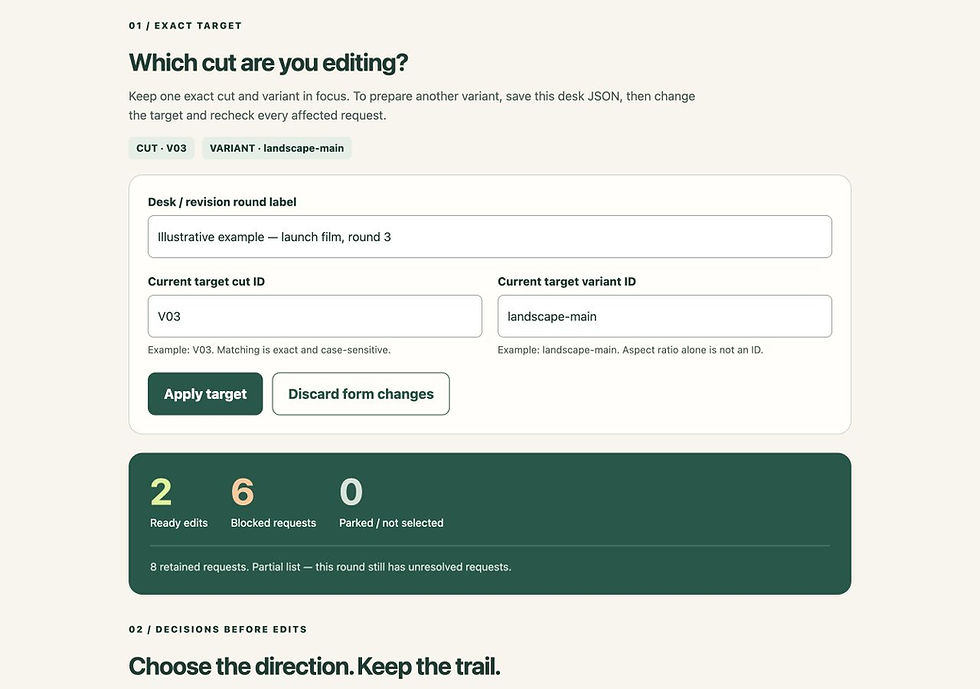
The optional free Revision Decision Desk using fictional notes. This screenshot shows the organising tool, not the email template or a real client's reply.
Use the reply—or organise notes you already have
You can use this message and a simple document without buying anything. If notes are already scattered, the free Revision Decision Desk and worked example provides a manual local record with separate edit and unresolved-question outputs. It does not read messages or send this email for you.
For work after the revision, try the free video, captions and article release workflow. Optional separate products are the US$9 Creator Release Toolkit, with its one-release guide, printable/editable workbook and release checklist, or US$29 Complete Creator Release System, which includes Essentials and adds planning and handoff for up to four releases. Choose the scope you need; neither purchase unlocks or is required for the free Desk. Check current contents and prices on the product pages.
Knowledge Skill Bank editorial team · 22 October 2026. Original communication template and fictional reply. These are suggested working practices, not measured customer results or a guarantee of agreement, fewer revisions or time savings.